Frametron

Play your videos like a sampler inside your DAW.

Launch price until November 15, 2026, then €49. Local currency applied at checkout.

Overview

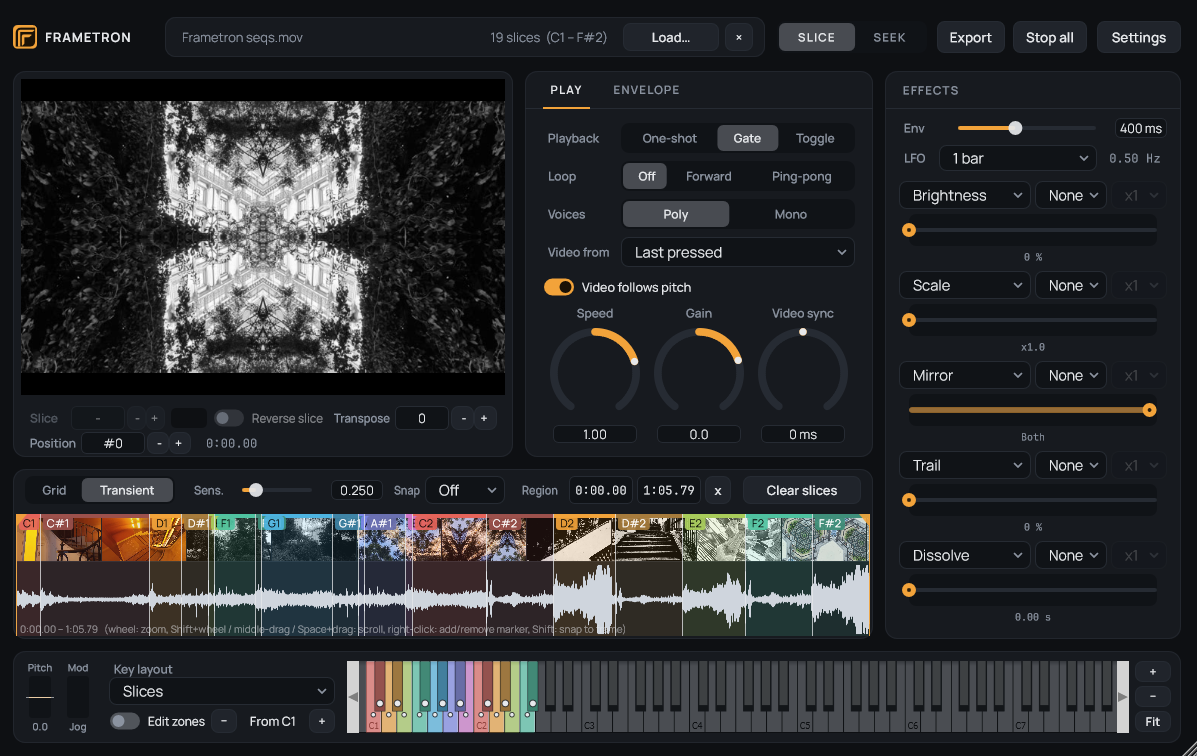
Frametron is a video sampler plugin that turns a video into an instrument. Load a clip, cut it into slices, and play the slices from a MIDI keyboard or from your DAW's piano roll, with the sound and the picture following your notes. Add live effects to the picture, then export the video in sync with your audio bounce and drop both in your video editor or your DAW video track.

Frametron in Slice mode: video preview, play controls, effects, waveform with colored slices and keyboard

About Frametron

Instead of treating video as something to add after the music is finished, Frametron lets you play and manipulate video like an audio sampler. Load a video, slice it, map the slices to MIDI notes and play sound and image together from a keyboard, a MIDI track or directly from the plugin. Audio and picture remain locked together as you play.

The idea is that video can become part of the musical material itself: it can be an audio source, a visual layer for your music, or both at the same time.

Because Frametron runs directly inside the DAW, the workflow stays very immediate. You can play it live, sequence it from MIDI, automate its controls and image effects, and then export the resulting video in sync with the audio bounce from the DAW. Frametron writes the video while the DAW renders the audio, so both files start at the same point and can simply be dropped together into a video editor.

Key features

Video as an instrument

Load a video, cut it into slices and play them from your keyboard, a MIDI controller or the DAW.

  • Cut the video into equal grid divisions or at the attacks of its audio, and add or remove markers by hand.
  • Each note plays a slice with its own sound, at the speed and pitch you play it, backwards if you like.
  • Play modes One-shot, Gate and Toggle, loops Off, Forward and Ping-pong, Poly or Mono voices, and an ADSR envelope.
  • Limit a long video to the region you need.
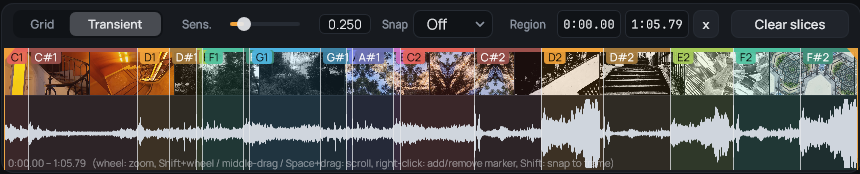
Frametron timeline with the video cut into colored slices, and the Grid and Transient slicing controls

Key zones

Decide which keys play which slice, and at which pitch.

  • Four layouts: one key per slice, the selected slice across the whole keyboard, an octave per slice, or custom zones.
  • The keyboard and the timeline share the same colors, so a slice and its keys are linked at a glance.
  • Draw zones by dragging on the keys and set a root note per zone.
  • Video follows pitch: the picture plays at the transposed speed like the sound, or keeps its own speed.
Frametron keyboard with keys colored like the slices they play

Seek mode

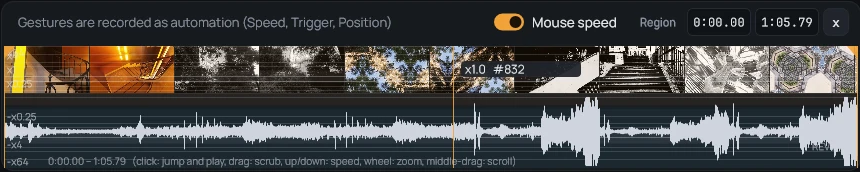
Turn the timeline into a seek bar and play the video by hand.

  • Click to jump to a frame and start playing; the height of the mouse sets the speed, from x-64 to x64, pause included.
  • Your gestures are recorded by the DAW as automation, exact to the frame, or as MIDI notes and controllers.
  • Use the mod wheel as a jog, a slice selector, a position or a transposition.
Frametron Seek bar: the playhead shows the speed set by the height of the mouse, with the Mouse speed switch

MIDI control and automation

Every control can be driven from a controller or automated by the DAW.

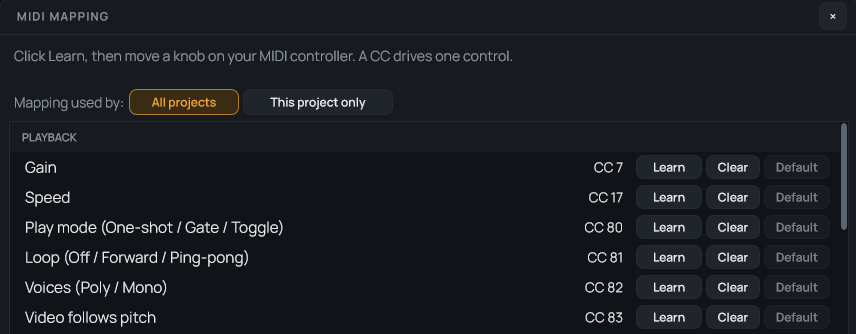
  • MIDI Learn on any knob, selector or effect bar, or edit the mapping in a dedicated window.
  • Mappings are global or saved with the project, and can be exported and imported as readable files.
  • Speed, slice, transpose, position and the effects are plugin parameters your DAW can automate.
  • Optional MIDI out, to record what you do with the mouse on a MIDI track.
Frametron MIDI mapping window

Video effects

Shape the picture while it plays.

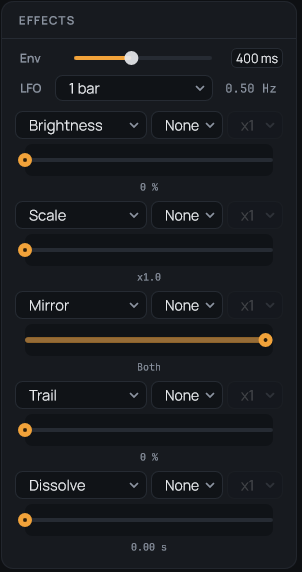
  • 25 effects in five families: Color, Geometry, Distortion, Blur and light, Time.
  • Five effects at once, each with a start and an end value.
  • Modulate them with velocity, a note envelope, an LFO locked to the host tempo, or the audio level.
  • Echo, trail, freeze, strobe and dissolve for time-based looks.
Frametron effects panel

Video export in sync with your bounce

The DAW writes the audio, Frametron writes a video file that starts at the same point.

  • Arm the Export button, run an audio mixdown in your DAW, and drop both files in your video editor or your DAW video track.
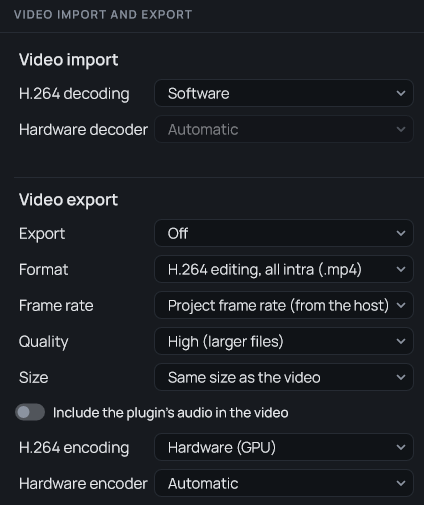
  • H.264 (all intra for editing, or compact for sharing), ProRes 422, DNxHR, FFV1 lossless, Motion JPEG and RAW.
  • The frame rate follows your project; the size is the video's or half; the plugin's own audio can be included.
  • Hardware H.264 encoding and decoding on your graphics card, if you want it.
Frametron video import and export settings

Made for long sessions

Open the videos you have and pick up where you left off.

  • Reads most video files through FFmpeg: MP4, MOV, MKV, AVI, WebM and more, including H.264, HEVC and ProRes.
  • The images are cached in memory for instant jumps and scrubbing, and on disk so a long video reloads in seconds.
  • Everything is saved in your DAW project, and a moved video can be located again without losing your slices.
  • Dark and light themes, and a window you can resize.

Try it first

Frametron runs in demo mode until you activate it with a license key.

  • Everything works: playback, slices, Seek mode, effects, MIDI and video export.
  • A FRAMETRON DEMO watermark is shown on the preview and written in every image of the exported video.
  • Saving projects works as usual, with no time limit.
  • One key activates Frametron on up to five of your machines.
Formats and systems VST3 on Windows 10 and 11 (Intel) and on macOS 11 and later (Apple silicon only), and Audio Unit on macOS.
VST3Audio UnitWindowsmacOS